1. Keep one project and its supporting files together
Separate projects by design, not just file extension. Put model variants, reference images, instructions, and the source link in the same project folder. Avoid combining every STL in a single directory.
Model library/
  Desk organizer/
    organizer-v1.stl
    organizer-v2.stl
    print-settings.3mf
    reference.jpg
    notes.txt
This is a suggested folder structure, not a required MakerHoard import format. A slicer-created 3MF may already contain several parts and settings.
2. Use names that explain the variant
Include the design name and useful differences, such as size or revision. For example, desk-organizer-wide-v2.stl is easier to distinguish than final-final2.stl. Keep the source license and any printing instructions with the project.
3. Preview before choosing a file
A visual library can help distinguish models with similar filenames. The MakerHoard development build has project cards and a preview panel. Verify preview behavior with your own STL and 3MF examples in the beta.
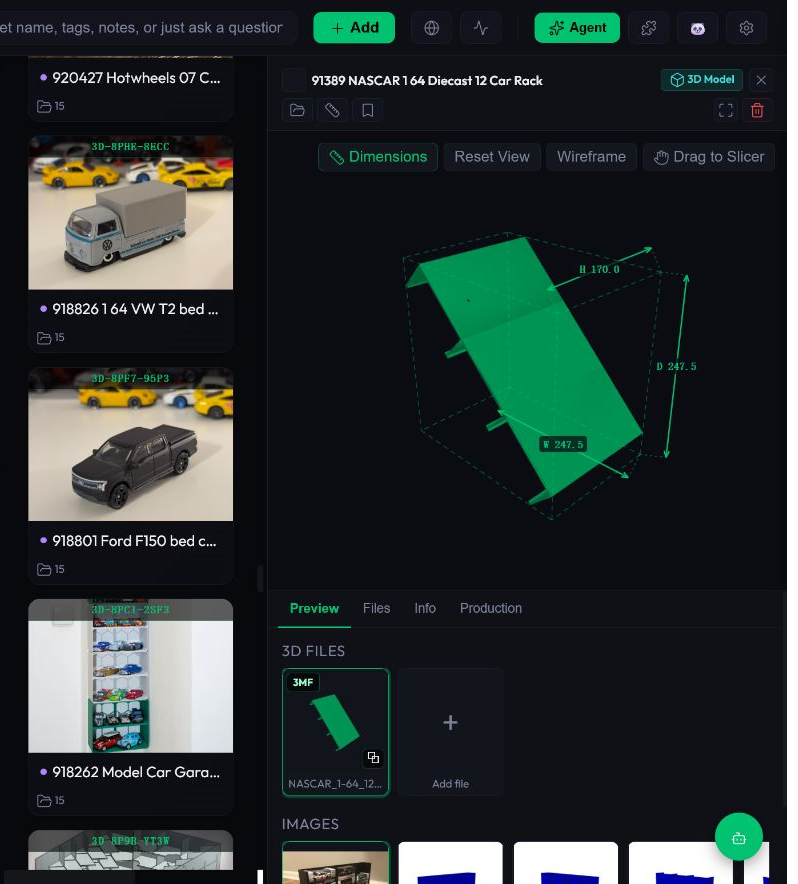
4. Add a few useful tags
Start with a small vocabulary: project type, intended use, and whether you have printed it. Use folders for project ownership and tags for cross-project discovery. Avoid tagging everything before you know what you actually search for.
5. Check export and recovery before importing more
On a copied test project, check that related files stay associated and that you can get your originals back out. Compare names and contents. Do not treat a thumbnail as proof that a model is printable.
6. Open the chosen file in your slicer
Use your slicer to check orientation, supports, dimensions, and printer-specific settings. MakerHoard is a library workspace; it does not replace this preparation step.
Questions
Should I separate STL and 3MF files?
Keep related versions in the same project folder. A 3MF can carry information an STL does not, so do not delete it just because the geometry looks similar.
Can I start without reorganizing my entire collection?
Yes. Try a copied sample of a few representative projects and evaluate that workflow before a larger migration.
Try a small collection first
Use copies of a few projects, keep your originals backed up, and check the actual beta behavior before importing a large library. The development screenshots do not establish that every feature is in the earlier installer.
Related guides
Written by the MakerHoard team · reviewed November 2, 2026. Report a correction or a bug.